How to enter Jurong Island
Entry to Jurong Island is limited to staff and visitors with a valid Jurong Island (JI) Pass. Individuals can apply for the JI Pass through a sponsorship system.
The process to enter Jurong Island is as follows:
- Step 1: Apply for JI Pass via sponsorship system
- Step 2: Access Jurong Island Pass app or Jurong Island Online Pass System
- Step 3: Track JI Pass application status
- Step 4: Proceed to the Jurong Island Pass Office or PDL halls for biometrics enrolment following application approval
- Step 5: Complete biometrics clearance
- Step 6: Enter Jurong Island and adhere to Dos and Don’ts
- Step 7: Manage JI Pass for future entries to Jurong Island
Apply for JI Pass
What type of passes can I apply for?
Please contact your sponsor to determine which pass type is most suitable for your application.
How do I apply for a pass?
Please contact your sponsor to initiate the sponsorship application process. Your sponsor can guide you through the steps or submit the application on your behalf.
Once your sponsor initiates a sponsorship, you will receive an email notification. Please follow the instructions provided in the email to submit your sponsorship request via the Jurong Island Online Pass System or Jurong Island Pass app (available on both Android & IOS).
How long does it take to process my application?
- Long-term pass (e.g. E Pass, S Pass): Up to 10 working days
- Short-term pass (e.g. CIP (Commercially Important Person), Visitor): About 3 working days
Access Jurong Island Pass App or Jurong Island Online Pass System
What is the Jurong Island Online Pass System and Jurong Island Pass app?
The Jurong Island Online Pass System and Jurong Island Pass app (available on both Android & IOS) are the official JTC portal and mobile app designed for Jurong Island pass holders.
Logging in to either allows you to view and complete sponsorships submitted by your sponsors, access your personal digital pass, and generate unique QR codes for two-factor authentication clearance.
How do I log in to the Jurong Island Online Pass System or Jurong Island Pass app?
Existing users can log in via the Jurong Island Online Pass System or Jurong Island Pass app (available on both Android & IOS).
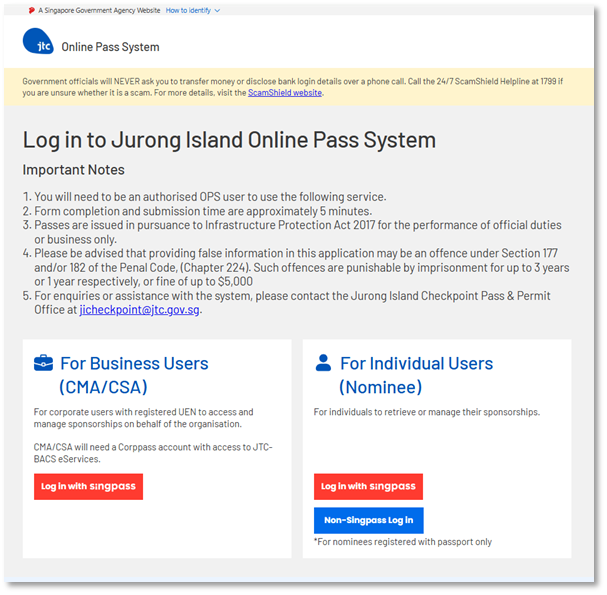
- To log in via the Jurong Island Online Pass System, scroll to the “For Individual Users (Nominee)” section and click the “Log in with Singpass” button. For nominees registered with passport only, click the “Non-Singpass Login” button.
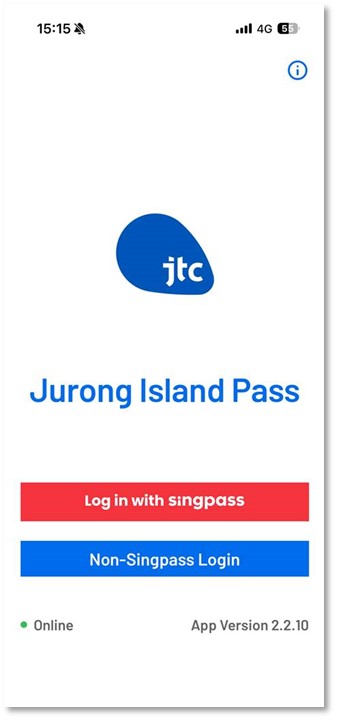
- To log in via the Jurong Island Pass app, click the “Log in with Singpass” button. For nominees registered with passport only, click the “Non-Singpass Login” button.
How do I update my personal information?
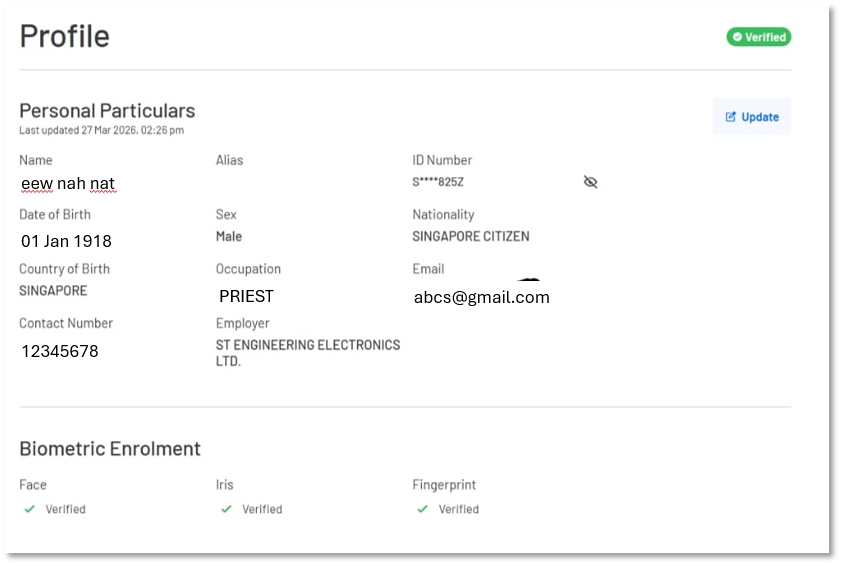
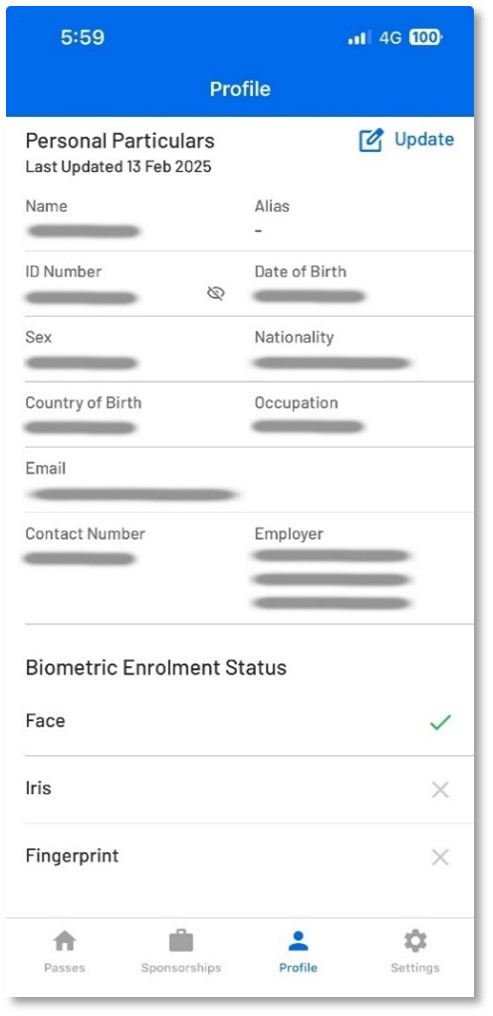
You can update your personal information via the Jurong Island Online Pass System or Jurong Island Pass app (available on both Android & IOS).
- To update via the Jurong Island Online Pass System, scroll to the “Personal Particulars” section under “Profile”, and click the “Update” button on the right. Please note that you can only update your email address and contact number through this system.
- To update via the Jurong Island Pass app, navigate to the “Profile” tab and then click the “Update” button.
Track JI Pass Application
How do I check the status of my sponsorship application?
You will receive an email notification once your sponsorship has been approved.
Alternatively, you can check your application status via the Jurong Island Online Pass System or Jurong Island Pass app (available on both Android & IOS).
- To check via Jurong Island Online Pass System, click the “My Sponsorships” tab to view your sponsorship application status.
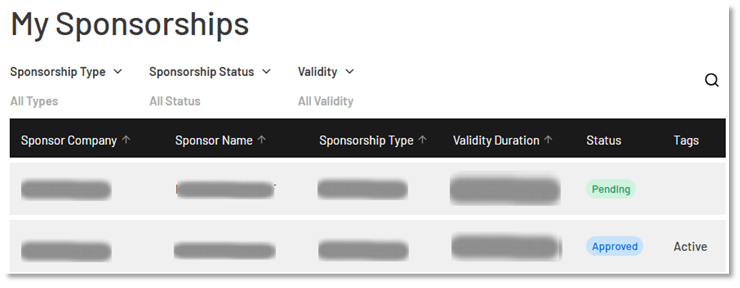
- To check via the Jurong Island Pass app, navigate to the “Sponsorships” tab
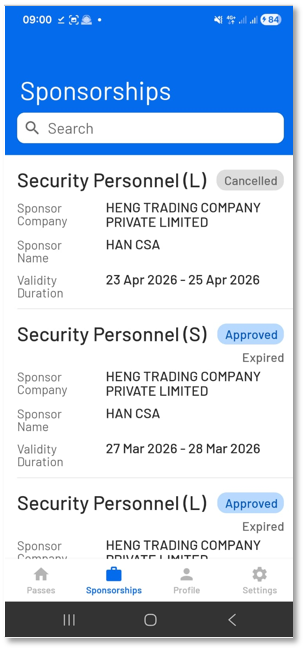
What do the different sponsorship statuses mean?
- Initiated: Your sponsorship has not been submitted. Please check your email or spam inbox to ensure that you have received an email from info@jurongisland.gov.sg to complete your sponsorship details.
- Pending: Your sponsorship has been submitted and is currently being processed by JTC.
- Cancelled: Your sponsorship has been withdrawn. Please contact your sponsor for more information.
- Approved: Your sponsorship has been approved, and you are granted entry to Jurong Island. Please proceed to the Jurong Island Pass Office for your biometrics enrolment.
- Not Approved: Your sponsorship has been rejected due to incorrect information entered during submission (e.g., wrong document ID). Please contact your sponsor for clarification.
How will I be notified when my application is processed?
You will receive an email once your application is approved. For other sponsorship-related enquiries, please contact your sponsor directly.
What should I do if my application is rejected or cancelled?
Please contact your sponsor to assist you with a fresh sponsorship application.
Biometrics Enrolment
Do I need to enrol my biometrics to enter Jurong Island?
To enjoy automated clearance at Jurong Island checkpoints, eligible pass holders [1] must complete a one-time biometric enrolment at self-service kiosks located at the Jurong Island Pass Office or PDL Halls. Please bring your physical document ID for this process.
For other pass holders [2], please present your physical/digital document ID to the officers at the checkpoint during clearance.
|
|
Sponsorship Type |
Biometrics Enrolment |
Clearance Mode |
|
[1] |
E Pass |
Physical document ID required at the self-service enrolment kiosk for one-time registration |
1. Face with iris |
|
S Pass |
|||
|
Visitor Pass |
|||
|
Supplementary Pass (16 years old and above) |
|||
|
[2] |
CIP (Commercially Important Person) |
Not required |
1. Present physical or digital document ID. |
|
Supplementary Child |
|||
|
Visitor Group Pass |
1. Present physical or digital document ID. |
How do I enrol my biometrics?
Please proceed to any self-service enrolment kiosk located at the Jurong Island Pass & Permit Office or PDL Halls. You will need to bring your physical document ID for the biometric enrolment process.
If you encounter any issues with biometric enrolment at the self-service kiosk, please proceed to the manual counter for assistance.
Do I need to re-enrol my biometrics if I apply for a new sponsorship?
Biometric enrolment is a one-time process. If you have completed it at any self-service kiosk or manual counter, you will not need to re-enrol your biometrics even for future sponsorships.
How can I check my current biometrics enrolment status?
You can check your current biometrics enrolment status via the Jurong Island Online Pass System or Jurong Island Pass app (available on both Android & IOS).
- To check via the Jurong Island Online Pass System, view your biometrics enrolment status in the dashboard.
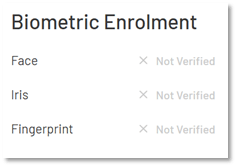
- To check via the Jurong Island Pass app, navigate to the “Profile” tab to view your biometric enrolment status.
Biometrics Clearance
What should I take note of when using biometric clearance?
When performing clearance, please:
- Look at the camera with a neutral expression (e.g. mouth closed)
- Ensure your face is not obscured by hats, scarves, or any reflective materials
This helps the system verify your identity smoothly and avoid delays.
Where can I generate the QR code for clearance (if required)?
You can generate the QR code for clearance via the Jurong Island Online Pass System or Jurong Island Pass app (available on both Android & IOS).
- To check via the Jurong Island Online Pass System, tap on “Generate QR Pass” from your dashboard and a QR code will be generated.
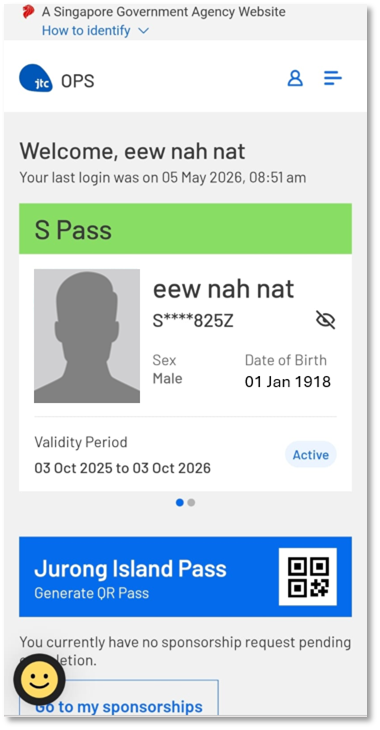
- To check via the Jurong Island Pass app, tap on “Generate QR Pass” and a QR code will be generated.

Entering Jurong Island – Do’s and Don’ts
Remember: The whole Jurong Island is designated as a Protected Area and access to any premise is by authorisation/permission only.
Do's
- Ensure that you have a valid JI Pass before entering Jurong Island or you will not be allowed to enter.
- Ensure you have enrolled your biometrics successfully at the Pass Office before proceeding for clearance at the checkpoint.
- Download the Jurong Island Pass app on your mobile phone. Readily retrieve and show your digital pass to any authorised officers where necessary.
- Provide your personal or employee identification cards to the authorised officer for inspection when requested by any authorised officer.
- If you are entering via self-drive, do carry out regular ‘housekeeping’ of your vehicle and remove unnecessary items especially in the vehicle’s boot, to speed up the clearance process.
- Slow down your vehicle when approaching the vehicular lanes and use the appropriate lane assigned to your vehicle type.
- Obey instructions and directions of authorised officers manning the traffic junction. Your vehicle may be redirected to alternative clearance lanes to alleviate traffic congestion.
- Stop your vehicle when directed, cooperate with the authorised officer, and open your vehicle boot for inspection at the lanes. Allow your belongings to be checked by the authorised officer and proceed orderly to where your company’s transport is parked. Allow the authorised officer to search the interior of your vehicle including the glove compartment and under the seats.
- Declare any camera, photographic or video recording equipment, including drones, in your possession and the corresponding approvals for inspection.
- If you are clearing at the PDL arrival halls, proceed to the turnstiles after alighting to clear via your biometrics. Get ready to retrieve your dynamic QR code via your mobile application and present it when necessary.
- Keep a lookout for and report immediately any suspicious persons, incidents or unattended parcels/items including vehicles, to the nearest security personnel, or by calling the police at 999 or the Jurong Island Operation Centre (JIOC) hotline at 62681020.
Don'ts
- Do not drive up onto Jurong Pier Flyover when intending to visit the Jurong Island Pass Office as you will enter straight into the checkpoint from the flyover and unable to turn left to the Pass Office. You will be denied entry and be turned away. Take Jurong Pier Road on the left lane beside the flyover instead.
- Do not use screenshot of your digital pass or dynamic QR code. The digital pass or dynamic QR code must be retrieved directly via the Jurong Island Pass app when requested.
- Do not use or attempt to use altered screenshots of another person’s digital pass or dynamic QR code. Additionally, do not allow another person to use altered screenshots of your digital pass or dynamic QR code to gain access into Jurong Island.
- Do not carry or have in your possession any of the following:
- Weapons, firearms, and any other objects resembling a weapon or firearm e.g. toy replica gun or swords
- Explosives, or incendiaries including timers, detonators, detonating cords, kerosene, firecrackers, etc.
- Sharp or pointed objects/dangerous items which can be used as weapons - knives, corkscrews, paper cutters, metal emery boards (nail polishers), box cutters, metal letter openers etc
- Blunt or large objects/items which can be used as weapons – baseball bats, cricket bats, golf clubs, truncheons, hockey sticks etc, unless justified to do so
- E-cigarettes, vape products, contraband cigarettes, or any other illegal or duty-unpaid tobacco products.
- Unauthorised drones (unmanned aerial vehicles)
- Do not engage in any photograph-taking or video-filming without official authorisation from JTC Corporation.
- Do not leave your vehicle, personal or company’s belonging unattended along any public road or thoroughfare on the island.
- Do not stray into areas that you are not authorised to access.
- Do not engage in any fishing, swimming and other unauthorised activities along the coast, waterways, canals, etc within the island.
- Do not drive your vehicle over the speed limit while commuting within the island.
- Do not ignore or attempt to run away when requested or ordered to stop by an authorised officer.
Managing JI Pass
When will my pass be deactivated?
Your pass will be automatically deactivated if there is no recorded entry into Jurong Island for:
- More than 30 days for foreigners using FIN or passport numbers, or
- More than 90 days for Singaporeans and Permanent Residents
What should I do if my pass is deactivated?
Please contact your sponsor to request reactivation of your pass before your next entry into Jurong Island. This will help avoid being turned away at the checkpoint.
Getting to JI Pass & Permit Office and Contact Us
How do I get to Jurong Island Pass Office?
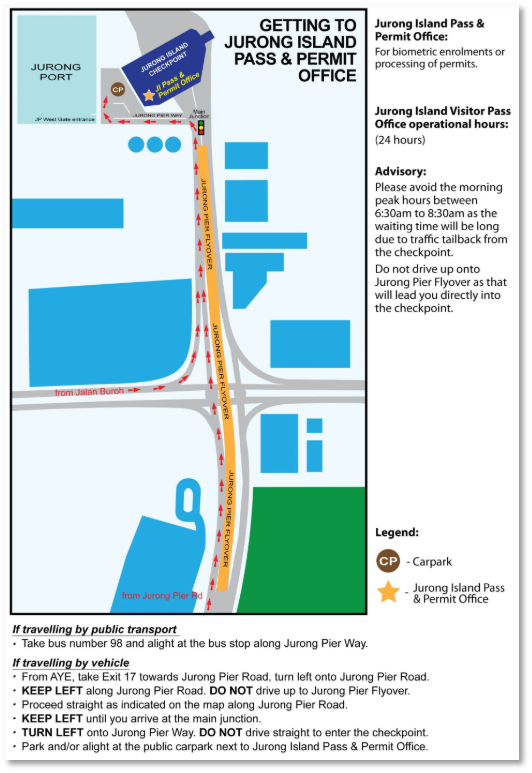
Who should I contact for more details?
For enquiries related to Jurong Island pass status or validity, please submit your enquiry here. For all other matters, please contact askJTC@jtc.gov.sg.